QR Codes on Packaging in Adobe Illustrator: Size, Colour and Print Rules
A QR code on a box, a label or a pouch has a harder life than one on a screen. It is printed small, on board, film or foil, often near a fold or on a curve, and it has to scan in a shop under bad light. Adobe Illustrator has no QR code tool, so the code usually arrives as an image from a web generator, which is the wrong starting point for a packaging file. This guide covers how to make it as artwork and the print rules that keep it readable.
Start with vector artwork, not an image
A packaging file goes through trapping, colour separation and often resizing for a family of pack sizes. A placed PNG or JPG survives none of that well: it is RGB, it has a fixed resolution, and its edges turn soft when scaled. Make the code as vector paths in the document.
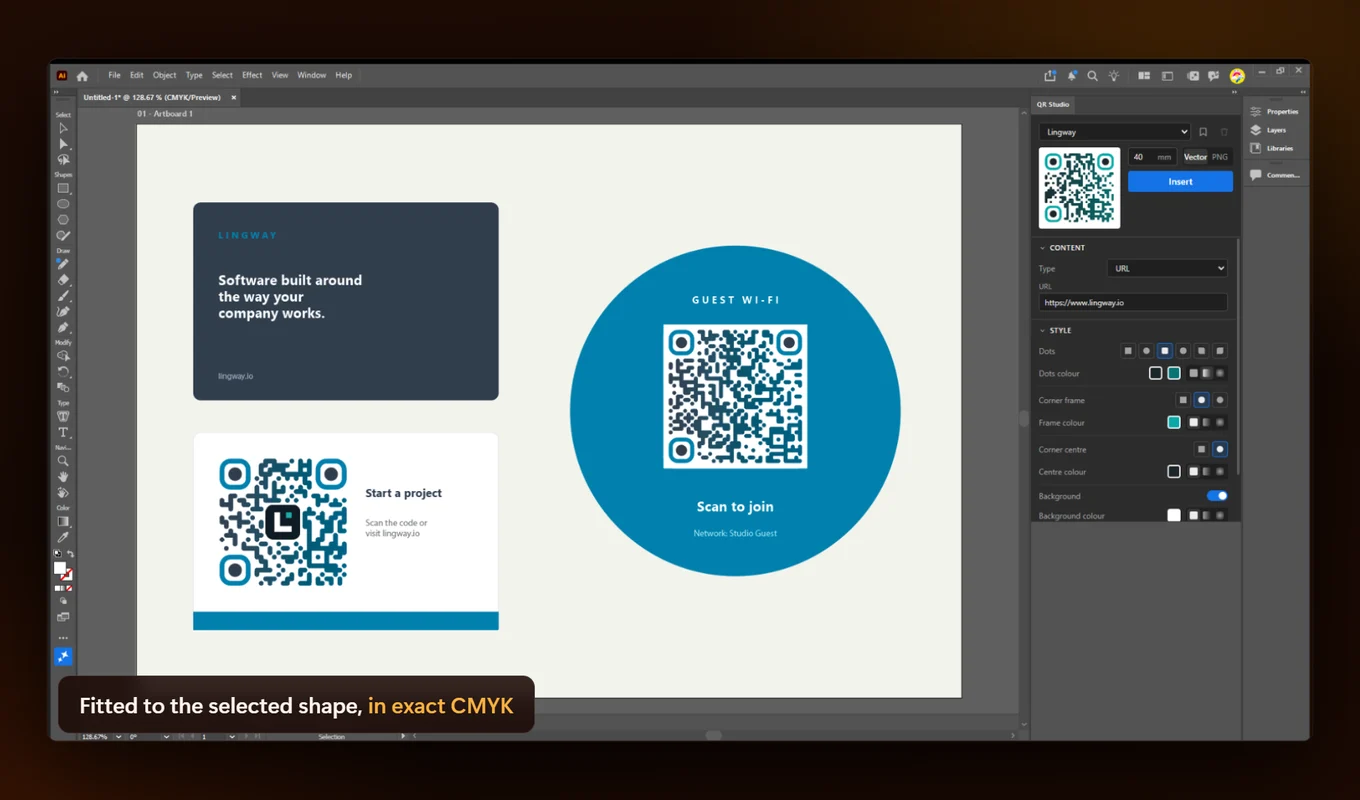
QR Studio for Adobe Illustrator draws the code directly on the artboard as native paths:
- Draw or select the area where the code goes on the dieline, for example a square on the back panel.
- Open Window > Extensions > QR Studio, choose the content (a website link in most packaging cases) and style it.
- Click Insert. The code is sized and centred on the selected shape, or placed at the size you set in millimetres.
In a CMYK document the colours land as exact process values. The code is ordinary artwork after that: you can move it to the right layer, recolour it to a spot ink and send it with the rest of the file.
For a code per product or per batch, such as a serial number on every label, see how to generate barcodes in bulk in Illustrator from CSV or Excel.
Size: 20 mm is the floor, not the target
- About 20 mm wide is a safe minimum for a short link on a flat, smooth, matt panel.
- Longer content means more modules. A long URL with tracking parameters makes a denser code whose modules are smaller at the same width. Use a short link that you control, so you can change where it points after the pack is printed.
- Go larger on rough board, kraft paper, textured labels and anything read from a distance, like a shelf-ready case.
- Keep the quiet zone. Leave a clear margin of about four modules around the code. Folds, glue flaps, seals and the edge of a label count as interference.
Colour: one dark ink
- Dark on light. Dark modules on a light background. Inverted codes (light on dark) fail on many phone cameras.
- One solid ink for the modules. Use 100% black or a dark spot colour. A four-colour rich black puts four plates on every module, and a small misregister blurs the edges.
- Spot colours. If the pack prints with a spot ink, recolour the code’s paths to that swatch after inserting it, then check the separations preview (Window > Separations Preview) to confirm the code sits on one plate.
- Check the contrast on the real material. Brown kraft, coloured board and metallic films all lower the contrast of a dark ink. On clear or metallic film, print a white underlay behind the code. QR Studio’s scan check warns about low contrast and inverted colours before you export, but it can’t see your substrate.
Curves, gloss and folds
- Curved surfaces. On a bottle, can or tube, the code bends away from the camera at its sides. Keep it small relative to the diameter, run it along the length of a narrow tube rather than around it, or move it to a flat panel such as a neck label or cap.
- Gloss and foil. Glossy varnish, laminates and foil reflect light into the camera. A matt area behind the code, or no varnish on it, helps more than a bigger code.
- Folds and seams. Never place a code across a fold, a crease or a seal. Keep it fully inside one panel, with its quiet zone.
Retail checkout codes are a different job
Most packaging QR codes link to a web page: instructions, recipes, recycling information, a warranty. Those only need to scan on a phone.
A code meant to be read at the checkout is different. The retail industry is moving from linear barcodes to 2D codes, and GS1’s Sunrise 2027 is the milestone for point-of-sale scanners to read them. Those codes carry the product number in a format that GS1 defines, at sizes it specifies. Ask your GS1 member organisation which standard applies before you design one, and keep the EAN or UPC barcode on the pack while the transition lasts. For the linear barcode, see the bulk barcode guide.
Test before press
- Print at final size on the closest material you have, ideally a press proof.
- Scan with two or three phones, including an older one, in normal room light, not just under a desk lamp.
- Scan from the real distance and angle: on a shelf, in a hand, on a curved sample.
- Check where the link goes on the proof, not the screen.
Checklist
| Check | Rule |
|---|---|
| Format | Vector paths, not a placed image |
| Size | At least about 20 mm, more for long content or rough surfaces |
| Quiet zone | About four modules, clear of folds, seals and edges |
| Ink | One solid dark ink, no rich black |
| Background | Light, matt, with a white underlay on film or foil |
| Placement | Flat panel, never across a fold |
| Content | A short link you control |
| Test | Printed proof, several phones, real distance |
For the basics of making a QR code in Illustrator, see how to make a QR code in Adobe Illustrator. To add a brand logo to the code, read how to add a logo to a QR code in Illustrator.
Sources
- DENSO WAVE, QR Code error correction feature
- GS1 US, Sunrise 2027
Frequently asked questions
How small can a QR code be on packaging?
About 20 mm wide is a safe minimum for a short link on a flat panel. Go larger for long content, curved surfaces, rough or glossy materials, and codes read from a distance. Always test-print at final size.
Should a packaging QR code be CMYK or a spot colour?
Either works if it is one dark ink. Print the modules in a single solid ink, such as 100% black or a dark spot colour, not a four-colour rich black, which can blur small modules if the plates are slightly out of register.
Can a QR code go on a curved bottle or can?
Yes, but the curve distorts the code as it wraps away from the camera. Keep the code small relative to the diameter, or place it on a flat panel, and scan a real printed sample.
Do retail scanners read QR codes on packaging?
Increasingly. GS1's Sunrise 2027 is the industry milestone for point-of-sale scanners to read 2D codes. A code meant for the checkout must follow GS1's rules for its content and size, so check with your GS1 member organisation.
Oussama Touzni is part of the team at Lingway, which makes plugins for Adobe InDesign, Illustrator, Photoshop and After Effects. LinkedIn