Translate InDesign documents with DeepL or AI
Our plugins translate the text of an InDesign document where it sits: in its own frames, with its own paragraph and character styles. Choose the engine and the workflow that fit your work, DeepL or AI models, one document or a whole batch of files.
Rated 4.7 out of 5Translator PRO: 4.7/5 from 51 ratings on Adobe Exchange (opens in a new tab)
What an InDesign translation plugin does
Translates in place
The text is sent to the engine you choose and written back into the same frames. No export, no copy and paste.
Keeps the layout
Paragraph styles, character styles, frames and positions stay as they were, so the translated document is ready for review.
Uses your own engine account
You connect your own DeepL, Google or AI provider key, so translation usage is billed by the provider at its own rates.
Four plugins, one job: translated InDesign documents
Each one is sold on Adobe Exchange and installs straight into InDesign.

Translator PRO for Adobe InDesign
Best for one document at a time with DeepL
Translate InDesign documents with DeepL and keep styles, formatting and layout intact.
$60 one-time purchase
InDesign 18.5 or later, DeepL API key
Get it on Adobe ExchangeProduct details
Translator PRO Batch Edition
Best for many INDD, IDML or ICML files in one run
Translate many InDesign, IDML and ICML files in a single run with DeepL, with styles and layout preserved.
$7 per month
InDesign 21.2 or later, DeepL API key
Get it on Adobe ExchangeProduct details
AI Translator Pro for Adobe InDesign
Best for AI models with control over tone and context
Translate InDesign documents with modern AI models while preserving formatting, styles, tables, and layout structure.
$6 per month
30-day free trial
InDesign 18.5 or later, AI provider key
Get it on Adobe ExchangeProduct details
Translator PRO Google for Adobe InDesign
Best for Google Translate and its wider language list
Translate InDesign documents with Google Translate, using your own API key.
$8 per month
InDesign 18.5 or later
Get it on Adobe ExchangeProduct detailsWhich plugin should you choose?
You translate one document at a time
Translator PRO gives you DeepL quality, glossaries and formality control, as a one-time purchase.
Translator PRO for Adobe InDesignYou translate many files or whole projects
Translator PRO Batch Edition takes INDD, IDML and ICML files and translates them in one session with DeepL.
Translator PRO Batch EditionYou need control over tone, audience or industry wording
AI Translator PRO connects to OpenAI, Gemini, Anthropic or another supported provider, and you describe the context and tone.
AI Translator Pro for Adobe InDesignYou need a language DeepL does not offer, or already pay for Google Cloud
Translator PRO Google uses the Google Cloud Translation API with your own key.
Translator PRO Google for Adobe InDesignCompare the plugins
| Compare the plugins | Translator PRO for Adobe InDesign | Translator PRO Batch Edition | AI Translator Pro for Adobe InDesign | Translator PRO Google for Adobe InDesign |
|---|---|---|---|---|
| Translation engine | DeepL (API Free or Pro) | DeepL (API Free or Pro) | Five AI providers, your choice of model | Google Cloud Translation |
| What it translates | The open document | Several INDD, IDML and ICML files | Full documents, selected frames or ICML parts | The open document |
| Batch processing | No, one document at a time | Yes | No, one document at a time | No, one document at a time |
| Terminology and tone | Glossaries, formality, context | Glossaries from CSV, formality | Glossary (CSV/TSV), context, industry tone | Source and target language |
| Where the text goes | Our secure backend, then DeepL. Translated documents are deleted within 24 hours. | Our backend in Germany, then DeepL. Files are deleted within 24 hours and API keys are not stored. | Directly from your computer to the AI provider you choose | Google Cloud, with your own API key |
| Requirements | InDesign 18.5 or later, DeepL API key | InDesign 21.2 or later, DeepL API key | InDesign 18.5 or later, AI provider key | InDesign 18.5 or later |
| Plugin price | $60 one-time purchase | $7 per month | $6 per month | $8 per month |
| Translation costs | DeepL API Free includes 500,000 characters a month; Pro is billed by DeepL | DeepL API Free includes 500,000 characters a month; Pro is billed by DeepL | Billed per token by your AI provider | Google includes 500,000 characters a month at no charge, then pay as you go |
| Adobe Exchange rating | 4.7 / 5 · 51 ratings | New, no ratings yet | 3.9 / 5 · 10 ratings | 3.8 / 5 · 4 ratings |
| Get it on Adobe Exchange | Get it on Adobe Exchange | Get it on Adobe Exchange | Get it on Adobe Exchange |
Prices and ratings as listed on Adobe Exchange in October 2026. Translation usage is paid to DeepL, Google or your AI provider, not to Lingway.
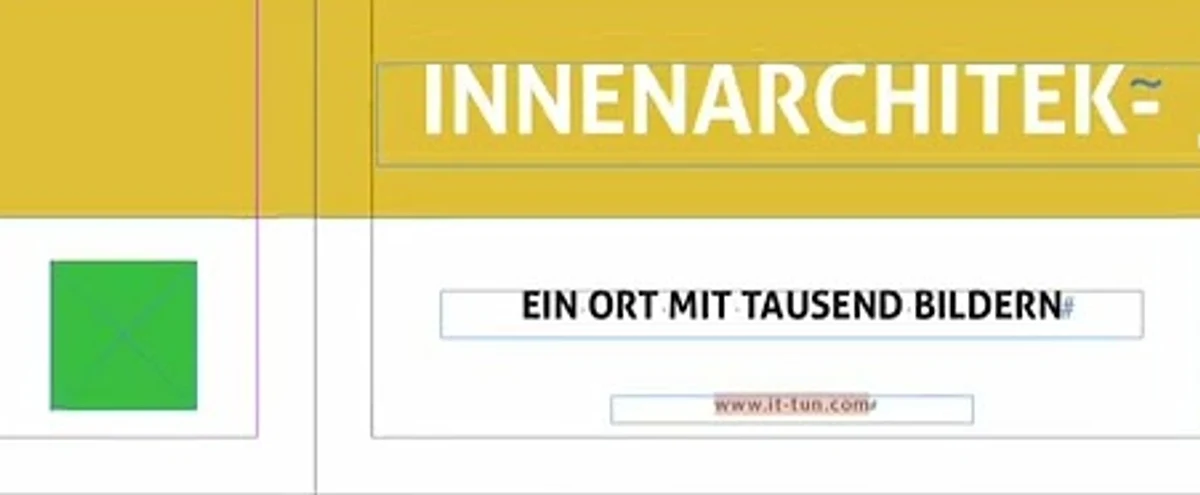
A real document, before and after
The cover of an interior design brochure, translated from English into German inside InDesign during one of our demo recordings. Nothing was retouched.
Preserved automatically
- Fonts, sizes and colours of every text frame
- Frame positions and the page layout
- Paragraph and character styles
- Images, shapes and colour areas
Still needs a human pass
- Longer text that no longer fits: here the German headline overflows its frame
- Line breaks and hyphenation, once the text language is set
- Characters your font may lack in some languages
- A native speaker's review of headlines and key messages
Watch a document being translated
A complete InDesign document translated with Translator PRO and DeepL, recorded in real time.
What customers say
4.7 out of 5
51 ratings for Translator PRO on Adobe Exchange, 47 of them five stars
1,800+
users have installed Translator PRO from Adobe Exchange
Official DeepL technology partner
as stated on the Translator PRO listing
“A Must-Have for Complex Multilingual Projects”
Packaging Queraltó, review title on Adobe Exchange · Read the reviews on Adobe Exchange
Figures as shown on Adobe Exchange in October 2026.
Learn the workflow
Step-by-step guides for each part of the job.
How to Translate an InDesign File with DeepL
Three ways to translate an Adobe InDesign document with DeepL: paste text, upload an IDML file, or translate inside InDesign with a plugin. Steps, limits and what to check afterwards.
How to Translate an IDML File with DeepL
What an IDML file is, how to export one from InDesign, how to translate it with DeepL, and how to avoid broken text, overset frames and missing links when you open the result.
InDesign Batch Translation: Translate Multiple Documents at Once
How to translate many Adobe InDesign files in one run: what to prepare, how INDD, IDML and ICML files differ, and how to keep terminology consistent across a whole project.
How to Fix Overset Text After Translating an InDesign Document
Translated text is longer than English. How much room to allow, how to find every overset frame in InDesign, and seven ways to make the text fit without wrecking the design.
DeepL or AI Models for InDesign Translation: Which Should You Use?
DeepL and AI language models such as ChatGPT, Gemini and Claude translate differently. A practical comparison for Adobe InDesign documents: consistency, control, cost and when to use each.
Questions about InDesign translation
Do I need a DeepL or AI account?
Yes. The plugins connect to the translation engine with your own API key: DeepL, Google Cloud or an AI provider such as OpenAI. Translation usage is billed by that provider.
Will my layout and styles be kept?
Yes. Text is replaced in its own frames with its paragraph and character styles. Translations are often longer than the source, so plan a short review to fit the text.
Can I translate several documents at once?
Yes, with Translator PRO Batch Edition, which translates INDD, IDML and ICML files in one session. The other plugins translate the open document.
Which InDesign versions are supported?
Translator PRO, AI Translator PRO and Translator PRO Google need InDesign 18.5 or later. Translator PRO Batch Edition needs InDesign 21.2 or later.
Can you build a custom translation workflow?
Yes. We build custom plugins and integrations, for example a connection to your translation management system or your own terminology database.
Pick your plugin and translate your next document today
Every plugin installs from Adobe Exchange in a minute. Not sure which one fits? Tell us about your documents and we will recommend one.