Log Viewer for Jira
Stop downloading log files. Log Viewer opens log attachments in a full-screen viewer inside the Jira issue, where you can search, filter, compare two runs and quote the exact lines in a comment.
- Opens .log, .txt, .out, .trace and .json attachments
- Understands Log4j, Logback and JSON logs
- Side-by-side comparison of two log files
- Optional AI analysis with your own key
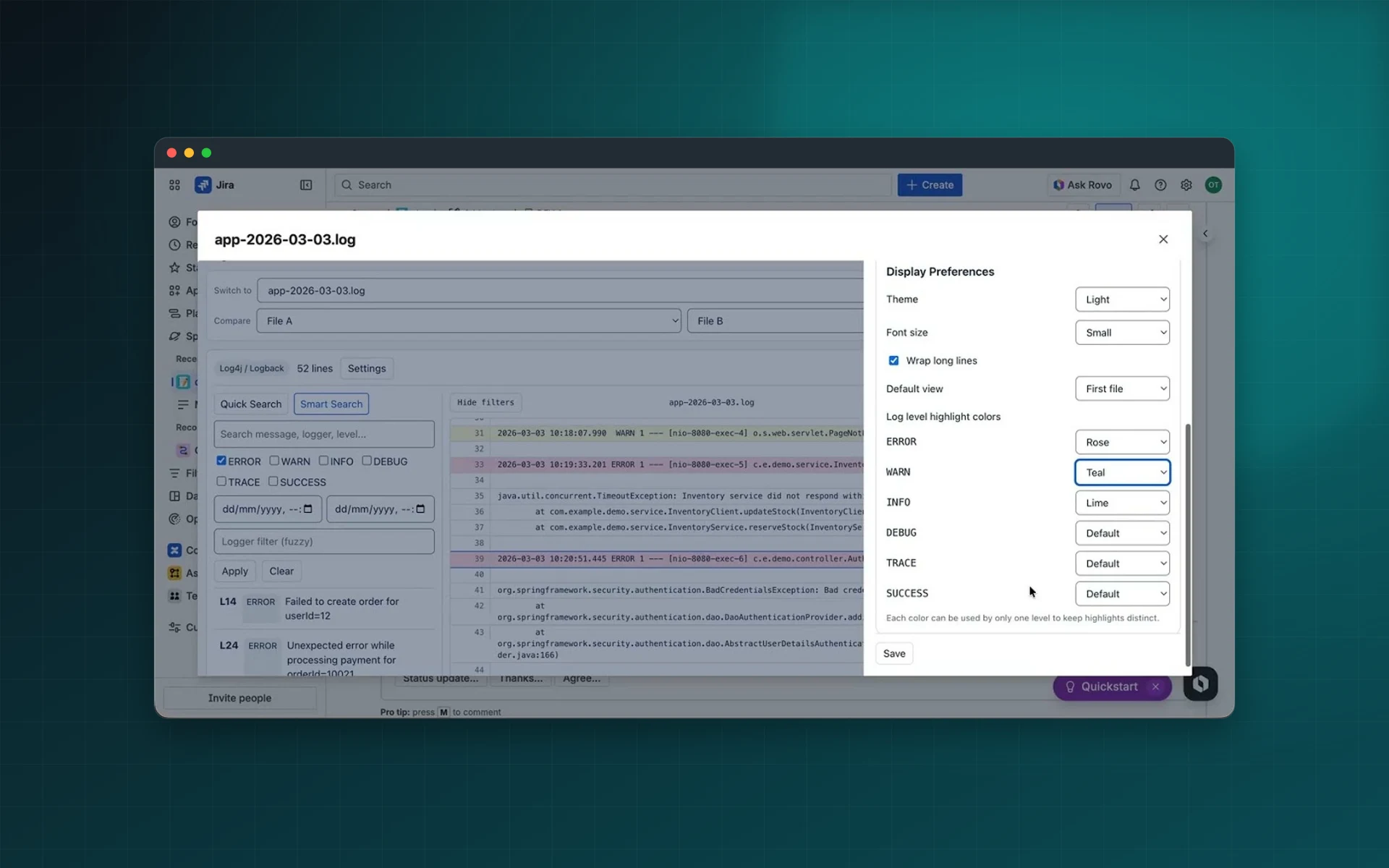
Built for investigation workflows in Jira
Log Viewer helps teams reduce investigation time, improve evidence quality in issue comments, keep context inside Jira, and standardize how incidents are analyzed.
Open and Inspect Log Attachments
Open attached log files directly in Jira and analyze them in a full-screen viewer.
- Supports
.log,.txt,.out,.trace, and.json - Optimized rendering for long logs
- Safe truncation behavior for very large files
Smart Log Parsing
Automatically parse common formats and expose structured fields for analysis.
- Detects Log4j and Logback patterns
- Handles JSON and plain text logs
- Extracts timestamp, level, logger, thread, and message
Quick Search and Smart Search
Find relevant signals fast using full-text and structured filters.
- Quick Search for fast text matching
- Smart Search for level, datetime, and fuzzy logger filtering
- Keyboard navigation through ordered results
Error-Focused Analytics
Prioritize important signals with built-in analytics.
- Live counts by log level
- Error timeline visualization
- Jump directly to important log lines
Side-by-Side Log Comparison
Compare two files in one view to isolate differences across runs.
- Highlights added lines
- Highlights removed lines
- Preserves unchanged context
Comment with Referenced Log Lines
Publish evidence-rich Jira comments directly from selected lines.
- Includes attachment reference and line numbers
- Supports optional investigation notes
- Adds selected snippet for clear audit trail
Optional AI-Powered Log Analysis
Run assisted analysis with your preferred provider and your own key.
- Supports OpenAI, Anthropic, Gemini, and Mistral
- BYOK setup in personal settings
- Control exactly what context is sent
Investigate logs directly inside Jira
Log Viewer for Jira allows engineering, support, and DevOps teams to inspect and analyze log attachments directly within Jira issues. Instead of downloading files or switching between tools, teams can open logs in a dedicated viewer, search intelligently, compare runs, and reference exact log lines when posting comments.
Why Teams Use Log Viewer for Jira
Faster incident triage Identify root causes quickly with structured parsing, filtering, and navigation tools built for large logs.
Better collaboration Share precise evidence by adding Jira comments that reference exact lines and attachments.
Less context switching Investigate logs from inspection to resolution without leaving Jira.
Optional AI-assisted analysis Analyze logs with your preferred AI provider using Bring Your Own Key (BYOK).
Core Features
Open and inspect log attachments
Supports common formats including .log, .txt, .out, .trace, and .json in a dedicated viewer optimized for long files.
Smart log parsing Detects common patterns such as Log4j, Logback, JSON logs, and plain text logs, then extracts fields like timestamp, level, logger, thread, and message.
Quick Search and Smart Search Combine fast full-text search with filters for log level, datetime range, and fuzzy logger matching.
Error-focused analytics Use level counts, error timeline views, and quick navigation to top error occurrences.
Side-by-side log comparison Compare two log files and highlight added, removed, and unchanged lines to understand differences between runs.
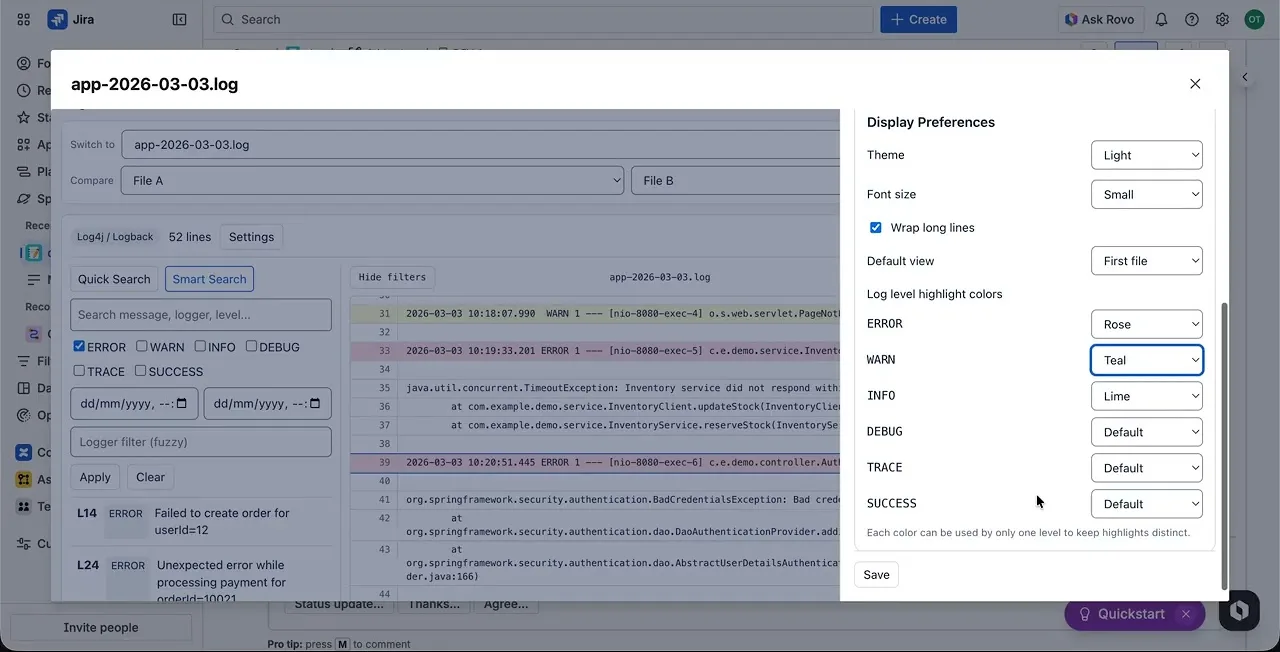
Flexible line highlighting Configure highlight colors by log level for readability in light and dark themes.
Multi-line evidence selection Capture evidence with single-click, Cmd/Ctrl-click toggles, and Shift-click range selection.
Comment with referenced log lines Generate Jira comments with attachment reference, exact line numbers, optional notes, and selected snippets.
Optional AI-powered log analysis Connect OpenAI, Anthropic, Gemini, or Mistral and choose selected lines, pasted snippets, or custom prompts.
User settings Save personal preferences including theme, font size, wrapping, viewer defaults, and API keys.
See Log Viewer for Jira in action
Open a log attachment, search it, compare two runs and comment with the exact lines, all inside the Jira issue.
Frequently asked questions
Which file types can it open?
.log, .txt, .out, .trace and .json attachments, in a viewer built for long files.
Which log formats does it parse?
Common patterns such as Log4j, Logback, JSON logs and plain text. It extracts timestamp, level, logger, thread and message.
Can I compare two log files?
Yes. Two files are shown side by side with added, removed and unchanged lines highlighted.
How does the AI analysis work?
It is optional. You connect your own key for OpenAI, Anthropic, Gemini or Mistral and decide exactly which lines or snippets are sent.
Can I reference log lines in a comment?
Yes. Select one or several lines and Log Viewer creates a Jira comment with the attachment, the line numbers, your note and the snippet.
Investigate logs where your team already works
Use Log Viewer for Jira to speed up incident triage, improve collaboration, and keep technical evidence inside Jira issues.