How to Make Hundreds of Barcodes in InDesign from CSV or Excel
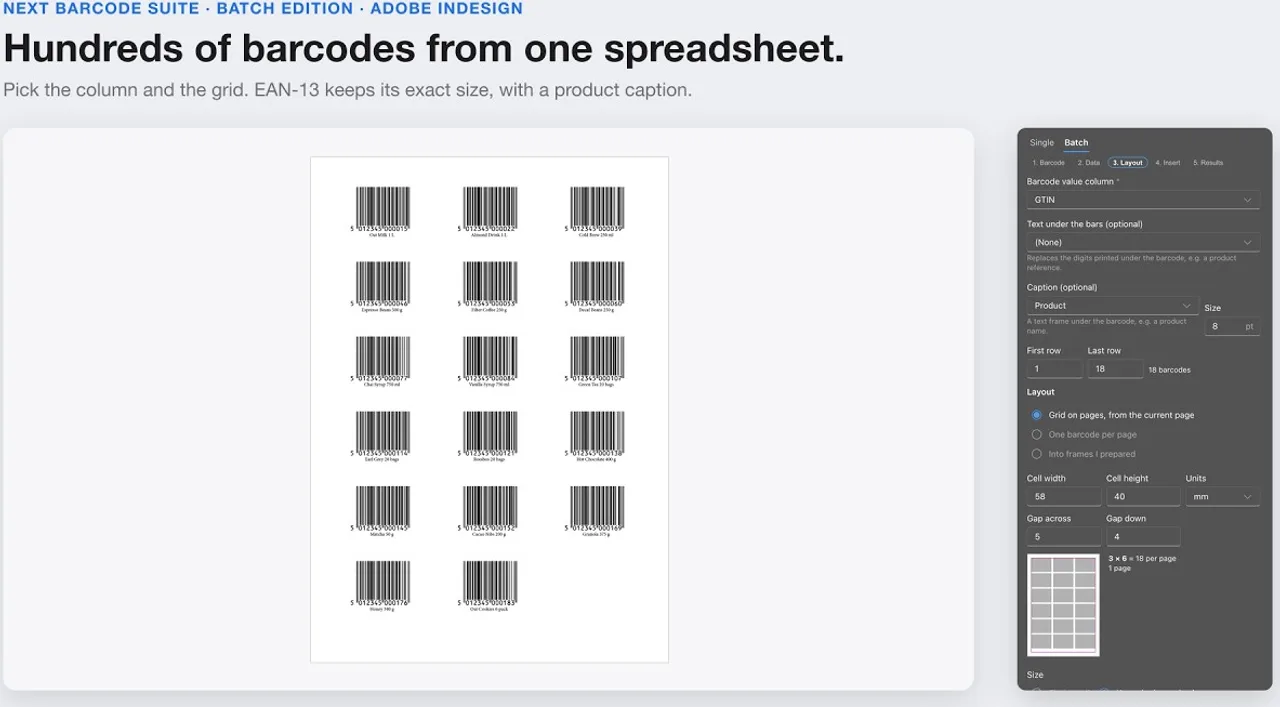
Product labels, tickets, asset tags and catalogue pages often need hundreds of barcodes, each from a row in a spreadsheet. InDesign can do part of this with Data Merge. For retail barcodes like EAN-13, you need a plugin. Here are both, and the traps that make a batch fail at the printer.
What InDesign can do on its own
Data Merge can generate QR codes from a column whose name starts with #. It can’t generate EAN, UPC, Code 128, Data Matrix or other linear and 2D barcodes, and it creates a new document per merge rather than filling the one you’re working in. For QR codes only, see how to create a QR code in Adobe InDesign.
Batch barcodes with Next Barcode Suite Batch Edition
Next Barcode Suite Batch Edition for InDesign turns a list into barcodes in your open document:
- Load the data: a CSV, TSV, TXT or Excel (.xlsx) file, or values pasted from a spreadsheet. Comma, semicolon and tab files are recognised. Or generate a number sequence (prefix, first number, step, digits, suffix: TICKET-0001 to TICKET-0300).
- Pick the column and the format: EAN-13, EAN-8, UPC, ISBN, GS1-128, ITF-14, Code 128, Code 39, QR Code, Data Matrix, PDF417, Aztec, postal codes and more (110 formats).
- Choose the layout:
- a grid with cell size and gaps in mm, cm, inches or points, adding pages as needed;
- one per page, centred in the margins;
- into your label frames: select empty frames, or name them “barcode” on every page.
- Optionally add a caption from another column, such as the product name.
- Click Insert.
Each barcode is a named group of vector paths in CMYK, RGB or your document swatches, with no linked files. Remove these barcodes takes the whole batch out again, with the pages it added.
Avoid the three classic failures
1. Leading zeros. Excel drops the leading zero of codes like 0012345678905. Format the column as Text before pasting, or check the CSV. The plugin warns when Excel may have dropped them.
2. Wrong check digits. EAN, UPC and ITF codes end in a check digit calculated from the others. A typo makes the code invalid. Batch Edition lists wrong check digits and invalid values by row number, with the expected digit, and never changes them silently. The other rows are still placed.
3. Wrong size. EAN and UPC codes have a nominal size; shrinking them too far makes them unreadable at the till. Batch Edition keeps their exact proportions through the magnification setting (80% to 200%).
How many at once?
We tested 300 Code 128 codes over 22 pages and 500 Data Matrix tags in one run. Long batches can be stopped at any time.
Batch Edition costs $64.99 once, works in InDesign 2025 (20.0) and later on macOS and Windows, and includes the single-barcode tab of Next Barcode Suite. For Illustrator, see bulk barcodes in Illustrator from CSV and Excel.
Sources
Frequently asked questions
Can InDesign make barcodes from a spreadsheet?
Data Merge can make QR codes from a spreadsheet, but InDesign has no built-in generator for EAN, UPC, Code 128 or Data Matrix. Next Barcode Suite Batch Edition places those and 100+ other formats from a CSV or Excel file in one run.
Why do my EAN codes lose their leading zero?
Excel treats the column as numbers and drops leading zeros. Format the column as Text before typing or pasting the codes, or save as CSV and check the file. Next Barcode Suite Batch warns when Excel may have dropped them.
Can I fill an existing label template with barcodes?
Yes. Name the empty frames "barcode" (or select them) and each row of the spreadsheet goes into the next frame, page after page, in reading order.
Fahd Jlif is part of the team at Lingway, which makes plugins for Adobe InDesign, Illustrator, Photoshop and After Effects. LinkedIn