 Chart typeDense categories
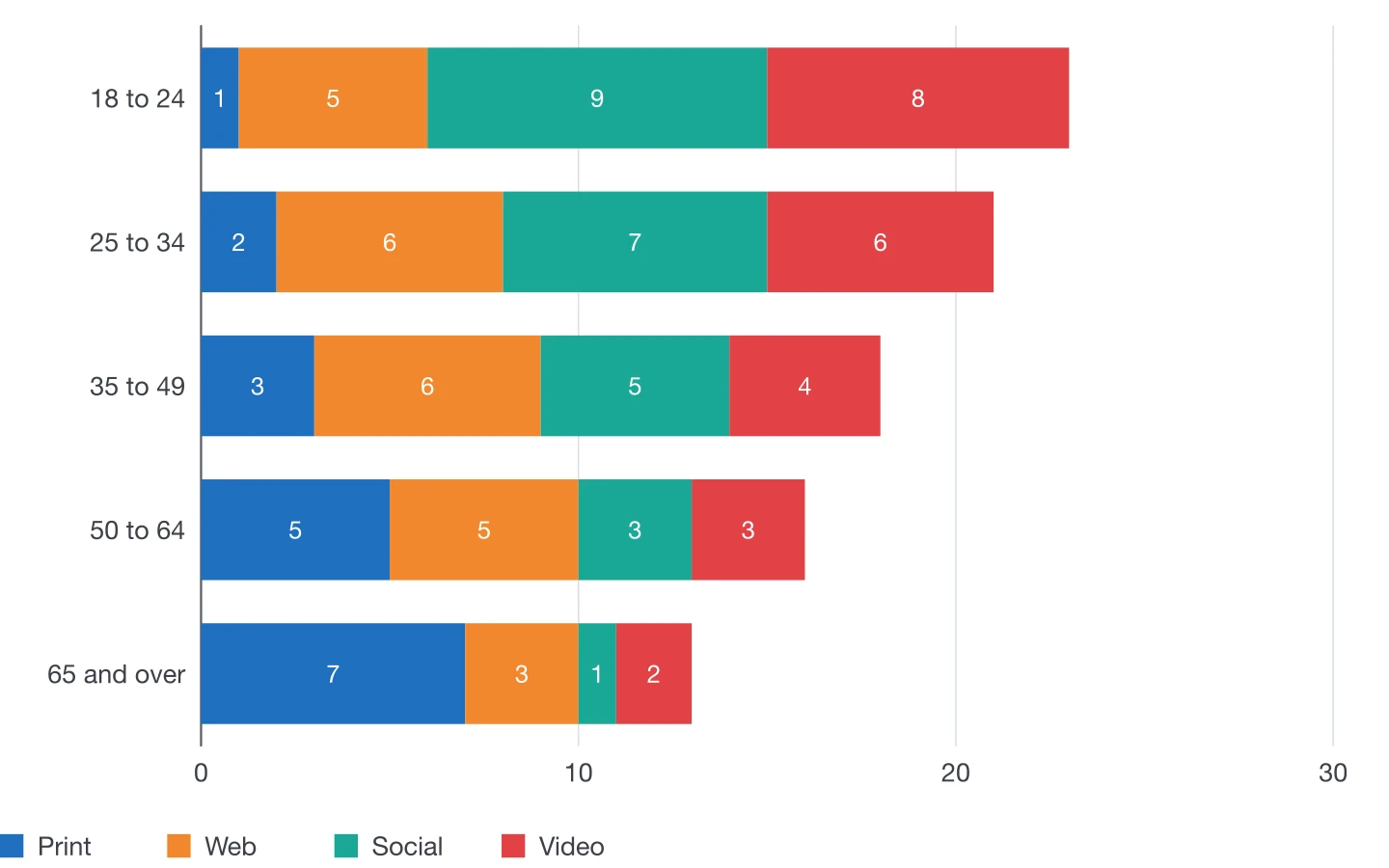
Stacked bar chart
Horizontal stacks for composition across many groups.
The horizontal version of the stacked chart: each bar is a total split into parts, with room for long group names on the left.
Plugin options
Options for this chart
- 1
Group gap
Thickness of the bars through the space between them.
- 2
Rounded ends
Round the outer end of each stack.
- 3
Value labels
Each part's figure inside its segment, in the light inside-label style.
- 4
Axis and gridlines
Gridline steps, tick marks, axis line and weights.
Also available for every chart
- Colours and styles
- DataInk object styles, one colour in tints or a swatch group of your document; your own paragraph styles for axis labels, values and legend.
- Legend
- Below or beside the chart, or as an InDesign table you style like any other.
- Numbers
- Number format of 14 locales, decimals, prefix and suffix (€, %, kg), compact numbers (12K).
- Size
- Width and height in your document's unit, or fit a frame you drew beforehand.
- Data
- Panel grid, large data editor, paste, Excel and CSV import, or a linked InDesign table.
- Presets
- Save the look, reuse it, and share it with your team as a file.
Editorial guide
When to use it
Typical use
Composition across many groups with long names: time spent per channel by age, budget split by department.
Better avoided
Many thin segments: labels no longer fit and the eye cannot compare them.
Layout tips
- Keep the same part order and colours across every chart of a report.
- Turn on value labels when there are few parts and enough room.
- Sort groups by total, or keep their natural order (ages, years).
Data structure
Sample data
Groups in the first column, one column per part of the stack.
Paste a table like this one, import it from Excel or CSV, or click in an InDesign table with the same layout.
| Age group | Web | Social | Video | |
|---|---|---|---|---|
| 18 to 24 | 1 | 5 | 9 | 8 |
| 25 to 34 | 2 | 6 | 7 | 6 |
| 35 to 49 | 3 | 6 | 5 | 4 |
| 50 to 64 | 5 | 5 | 3 | 3 |
| 65 and over | 7 | 3 | 1 | 2 |
Other chart types
Make your next chart in InDesign
Buy DataInk once, on Adobe Exchange or Gumroad, and draw every chart of your layout natively, in your own styles.
Get DataInk for InDesign