How to Group Layers in After Effects Without Precomposing
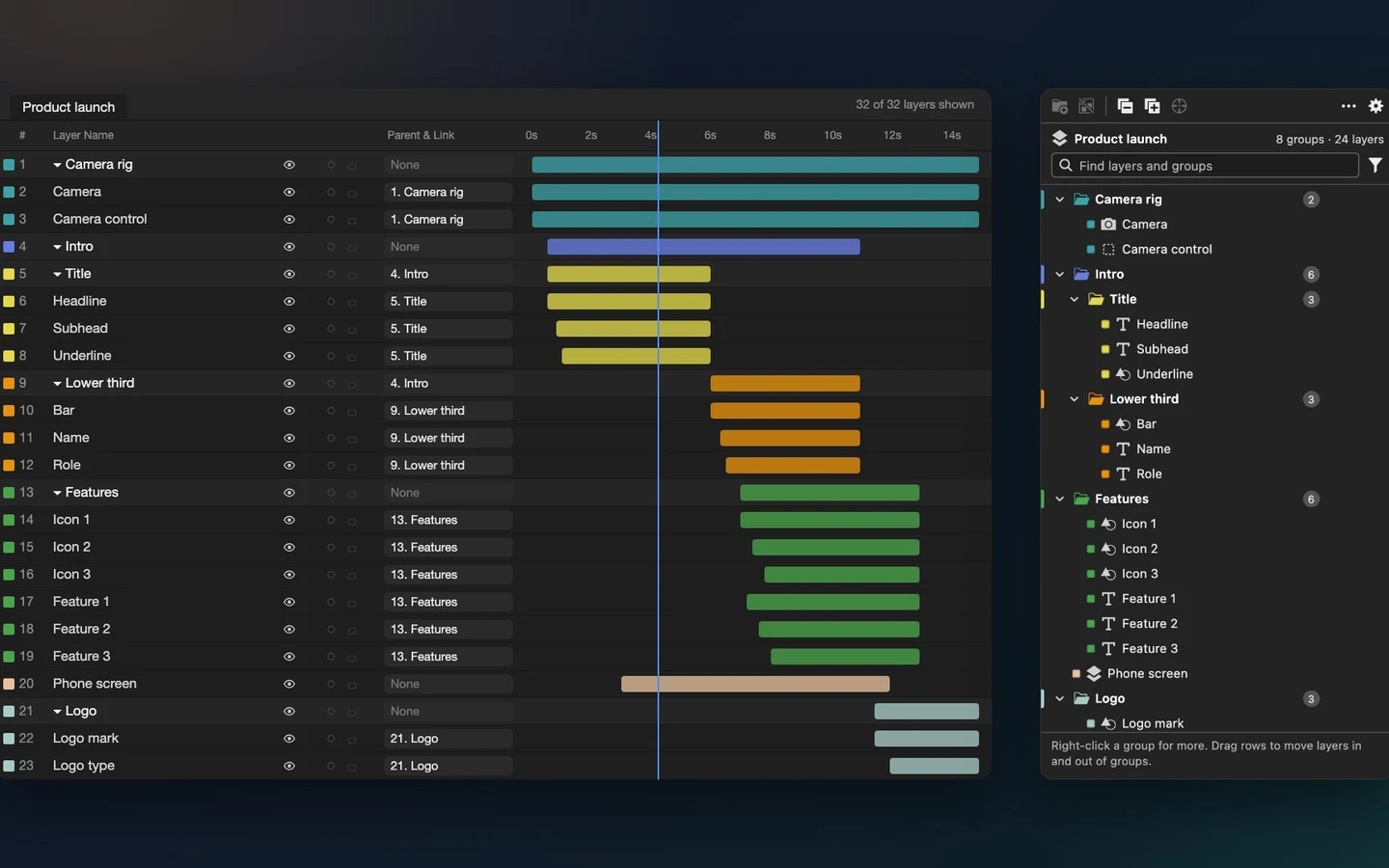
After Effects has no folders in the timeline. The Project panel has folders, but once you’re in a comp with 60 layers there is no way to fold a set of them into one row. The usual answer is to precompose, which comes at a cost. This guide compares the built-in workarounds and shows how Layerfold adds real groups with Cmd+G.
Why precomposing isn’t grouping
Layer > Pre-compose (Cmd+Shift+C, Ctrl+Shift+C on Windows) moves the selected layers into a new comp and puts that comp back as one layer. It tidies the timeline, but:
- It can crop your layers. With Move all attributes into the new composition, the precomp has its own size and anything outside it is cut unless you turn on Collapse Transformations.
- It breaks links. Expressions and parenting that point to layers outside the precomp stop working or need rewriting.
- It splits track mattes from the layers they belong to.
- It hides the animation. To change a keyframe you open another comp, and timing across comps gets harder to see.
Precomps are the right tool for reuse and for applying one effect to several layers. They are the wrong tool for organising.
The built-in workarounds
| Workaround | How | What it doesn’t do |
|---|---|---|
| Label colours | Give related layers one colour, then Edit > Label > Select Label Group | Doesn’t fold the layers |
| Shy layers | Mark layers shy, then turn on Hide Shy Layers | Hides them all at once, not per group |
| Parent null | Parent layers to a null and move the null | Moves them, but doesn’t hide, solo or fold them |
| Name prefixes | Name layers “BG_”, “UI_” and search the timeline | Search, not structure |
Each gives you part of a folder. None gives you all of it.
Real groups with Layerfold
Layerfold combines those same building blocks into groups you can use like folders:
- Select layers in the timeline or the Layerfold panel.
- Press Cmd+G (Ctrl+G on Windows). The layers become a group, in the same comp, in the same order, with the same keyframes, expressions and parenting.
- Fold one group, all groups, or every group except the one you’re working on (Focus).
From there a group behaves like one thing:
- Hide, solo, lock and mute the whole group. Each layer’s own setting comes back when you switch the group back.
- Move it in time: to the current time, by frames, trim the start or end, stretch it, or slip its contents.
- Transform it: members are parented to the group’s header layer, so moving, scaling or rotating the header moves the group.
- Nest groups and browse them in a searchable folder tree, with a count per folder.
- Convert: open a precomp as a group, or turn a group into a precomp when you do need one.
- Start from what you have: one click turns layers sorted by label colour or name prefix into groups.
Will the project open without the plugin?
Yes. A Layerfold group is made of things every After Effects version already has: a null layer, parenting, label colours and shy switches. Clients, template buyers and render farms open a normal project with no missing-effect warning, and Layerfold can be removed from a comp or a whole project in one step. Every action is one step in Edit > Undo.
Which should you use?
- Reusing an animation in several places, or applying one effect to many layers: precompose.
- Moving a set of layers together: a parent null is enough.
- Organising a long timeline so you can fold, focus and switch sections on and off: use groups.
Layerfold works in After Effects 2022 and later, on macOS and Windows. It costs $39 once and has a 14-day free trial.
Sources
Frequently asked questions
Can you make folders in the After Effects timeline?
Not natively. After Effects has no layer folders; the Project panel has folders, but the timeline doesn't. The usual workarounds are precomps, label colours, shy layers and a parent null. A plugin such as Layerfold adds foldable groups that stay in the comp.
What's wrong with precomposing?
Precomposing moves layers into a new comp. Depending on the options, it can crop them to the precomp's bounds, breaks expressions and parenting that reach outside it, splits track mattes from their layers, and hides the animation in a comp you have to open.
How do I group layers in After Effects without a plugin?
Give the layers the same label colour and use Select Label Group, parent them to a null to move them together, and mark them shy to hide them from the timeline. None of these folds the layers into one row.
Oussama Touzni is part of the team at Lingway, which makes plugins for Adobe InDesign, Illustrator, Photoshop and After Effects. LinkedIn