par Lingway Team
How to Translate an IDML File with DeepL
IDML is the usual way to get text out of Adobe InDesign and back in again. If you want to translate an IDML file with DeepL, it helps to know what the file contains and where the process tends to go wrong. This guide covers both.
What is an IDML file?
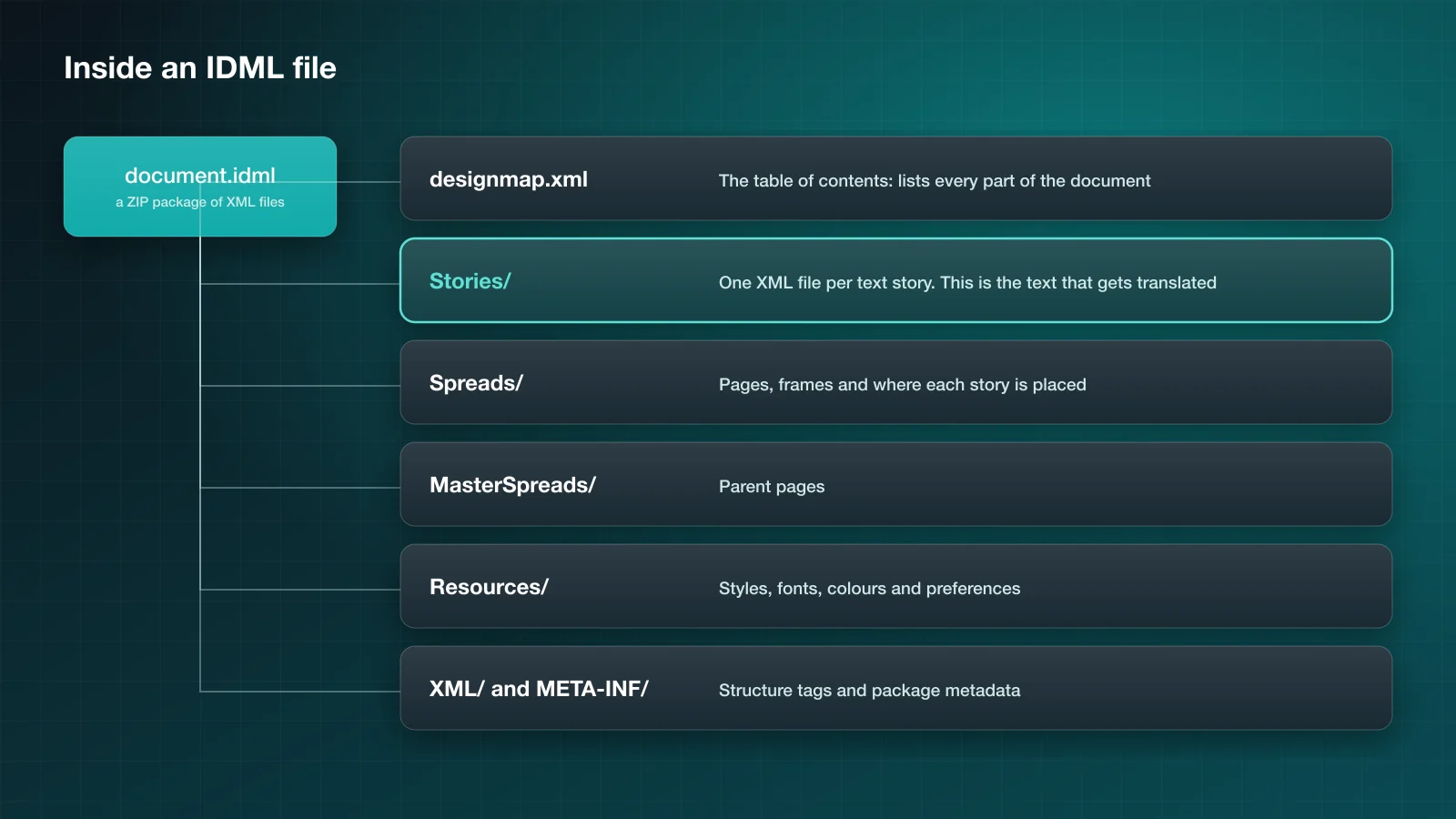
IDML stands for InDesign Markup Language. An .idml file is a ZIP package of XML files that describes a whole InDesign document: its pages, frames, styles and text. Because it is plain XML, other software can read it and change it, which is why translation tools work with IDML instead of the binary .indd format.
The parts that matter for translation:
- Stories hold the text. Each story, meaning a text frame or a chain of threaded frames, is one XML file.
- Spreads describe pages and frames and say which story sits where.
- Resources hold paragraph styles, character styles, fonts and colours.
A translation should change the content of the stories and nothing else. Styles, frames and positions stay exactly as they were.
Step 1: prepare the InDesign document
A few minutes here save a lot of repair later.
- Use paragraph and character styles instead of manual formatting.
- Remove forced line breaks inside sentences. A break in the middle of a sentence splits it into two pieces, and each piece is translated on its own.
- Thread frames that belong to one story, so the text can flow when it gets longer.
- Resolve missing fonts and links.
Step 2: export the IDML
In InDesign choose File > Save As and select InDesign CS4 or later (IDML) as the format. You can also use File > Export and pick IDML. The .indd file stays untouched; you get a separate .idml file.
Step 3: translate the IDML with DeepL
The DeepL API supports IDML as a document format. You upload the file, choose the target language, and download a translated IDML with the same structure.
Limits to know:
| DeepL API Free | DeepL API Pro | |
|---|---|---|
| File size | 10 MB | 30 MB |
| Characters per file | 500,000 | 1 million |
IDML files are usually small because images are linked, not embedded. If a file is over the limit, embedded images are the likely reason.
Two options improve the result:
- A glossary keeps brand and technical terms consistent. It needs the source language to be set.
- Formality sets a formal or informal tone in the languages that support it.
Step 4: open the translated file in InDesign
Open the translated .idml in InDesign and save it as a new .indd. Then check:
- Links. IDML stores paths to images, not the images. Keep the file next to the same Links folder, or relink.
- Overset text. Longer translations overflow their frames. The Preflight panel lists every overset frame.
- Fonts. If the target language needs characters your font lacks, InDesign highlights the substituted glyphs.
- Text language. Set the language on the translated text so hyphenation and spelling follow the right dictionary.
Common problems and how to avoid them
Sentences translated in fragments. Manual formatting in the middle of a sentence, such as one bold word, splits the text into several runs in the XML. Good tools keep the sentence together; simple ones translate the pieces separately. Character styles applied cleanly reduce the risk.
Text that should not be translated. Product codes, brand names and addresses get translated like everything else. Put them in a glossary as “translate to itself”, or keep them on a separate layer that you leave out.
Tables. Cell text is translated, but column widths do not adapt. Expect to adjust tables by hand.
Updates to the source. When the English changes after translation, a file-based process means exporting and translating again, then redoing layout fixes.
A shorter route: skip the export
The export and import steps exist only because the translation happens outside InDesign. A plugin removes them.
- Translator PRO for Adobe InDesign translates the open document with DeepL, in place.
- Translator PRO Batch Edition accepts
.idmlfiles directly, along with.inddand.icml, and translates many of them in one session. InDesign documents are exported to IDML automatically.
Summary
Translating an IDML file with DeepL works well when the source document is clean: styles instead of manual formatting, threaded frames, no forced breaks. Plan time for overset text afterwards, and use a glossary from the first file onwards. If you do this often, compare the file route with the other options in how to translate an InDesign file with DeepL.